Manual.ly Logo

Bosch DIY EasyDrill 1200 Sayong-Seolmyeongseo

0.0 · 0 평점

PDF 설명서 · 215 페이지

한국어

M: OA-GPT-54-NAN
페이지

/ 215

Loading...
373598f794fee1c172941749f256260fbe1b page 11
English | 17
Operation
Starting Operation
Inserting the battery
Note: The use of batteries unsuitable for your power tool can
lead to malfunctions or damage to the power tool.
Set the rotational direction switch (6) to the middle position
to avoid unintentionally switching it on. Insert the charged
battery (8) into the handle until you feel it engage and it is
flush with the handle.
Setting the rotational direction (see figureC)
The rotational direction switch (6) is used to change the ro-
tational direction of the power tool. However, this is not pos-
sible while the on/off switch (10) is being pressed.
Right rotation: To drill and to drive in screws, press the ro-
tational direction switch (6) through to the left stop.
Left Rotation: To loosen and unscrew screws and nuts,
press the rotational direction switch (6) through to the right
stop.
Setting the Operating Mode
Drilling
EasyDrill 1200:
Set the torque presetting ring(3) to the
"drilling" symbol.
EasyImpact 1200:
Set the operating mode presetting ring(4) to
the "drilling" symbol.
Screwdriving
EasyDrill 1200:
Set the torque presetting ring(3) to the re-
quired torque.
EasyImpact 1200:
Set the operating mode presetting ring(4) to
the "screwdriving" symbol.
Set the torque presetting ring(3) to the re-
quired torque.
Impact drilling
EasyImpact 1200:
Set the operating mode presetting ring(4) to
the "impact drilling" symbol.
Preselecting the Torque
The torque presetting ring (3) can be used to preselect the
required torque in 20 stages. When the correct setting is
used, the application tool will be stopped when the screw is
driven flush into the material or once the set torque has been
reached. In position the overload clutch is deactivated,
e.g. for drilling.
When unscrewing screws, you can select a higher setting or
set the tool to the symbol.
Adjusting the Speed
You can adjust the speed of the power tool when it is on by
pressing in the on/off switch (10) to varying extents.
A light pressure on the on/off switch (10) results in a low ro-
tational speed. Increased pressure on the switch causes an
increase in speed.
Adjusting the Speed/Impact Rate (EasyImpact1200)
You can adjust the speed/impact rate of the power tool when
it is on by pressing in the on/off switch (10) to varying ex-
tents.
Applying light pressure to the on/off switch (10) results in a
low rotational speed/impact rate. Applying increasing pres-
sure to the switch increases the speed/impact rate.
Mechanical gear selection
u Only operate the gear selector (5) when the power
tool is not in use.
You can preselect two speed ranges with the gear selector
(5).
Gear I:
Low speed range; for screwdriving or working with a large
drilling diameter.
Gear II:
High speed range; for working with a small drilling diameter.
If the gear selector switch (5) cannot be pushed all the way,
turn the tool holder (1) with the application tool slightly.
Switching on/off
To start the power tool, press and hold the on/off switch
(10).
The lamp (11) lights up when the on/off switch (10) is lightly
or fully pressed, meaning that the work area is illuminated in
poor lighting conditions.
To switch off the power tool, release the on/off switch (10).
Fully automatic spindle lock (Auto-Lock)
The drill spindle, and therefore the tool holder(1), are
locked when the on/off switch (10) is not pressed.
This enables screws to be screwed in even when the battery
(8) is empty and allows the power tool to be used as a
screwdriver.
Run-out brake
Upon releasing the on/off switch (10), the drill chuck is
slowed down, which prevents the application tool from con-
tinuing to rotate.
When driving in screws, you should therefore only release
the on/off switch (10) once the screw has been inserted
flush into the workpiece. This way, the head of screw will not
penetrate the workpiece.
Temperature-dependent overload protection
In normal conditions of use, the power tool cannot be over-
loaded. In the event of heaving loading or the temperature
rising/falling outside the permitted battery temperature
range, the speed will be reduced. The power tool will not run
at full speed again until the permitted battery temperature
has been reached.
Bosch Power Tools 1 609 92A 7WD | (20.06.2022)

AI를 사용하여 Bosch DIY EasyDrill 1200 매뉴얼과 대화하세요

Bosch DIY EasyDrill 1200 매뉴얼에서 AI로 즉각적인 답변을 받으세요

Bosch DIY EasyDrill 1200에 대해 무엇이든 물어보세요. 이 매뉴얼의 해당 페이지를 기반으로 답변이 제공됩니다.

EasyDrill 1200 정비 일정

장시간 저속 사용 후
공구 냉각

장시간 저속으로 작업한 후에는 부하 없이 최대 속도로 공구를 약 3 분간 가동하여 냉각하십시오.

매뉴얼에서 보기 (17페이지)
사용 전 또는 필요 시마다
이동 부품 및 상태 점검

사용 전에 이동 부품이 걸림 없이 정상적으로 작동하고 파손되거나 손상된 부품이 없는지 확인하십시오.

매뉴얼에서 보기 (6페이지)
필요 시마다
공구 및 환기 슬롯 청소

안전하고 효율적인 작동을 위해 전원 공구와 환기 슬롯을 깨끗하게 유지하십시오.

매뉴얼에서 보기 (10페이지)
M: QW-35-FL

질문을 하세요

0/1000

EasyDrill 1200을(를) 추천하시나요?

예 아니요

자주 묻는 질문 질문

A

This cordless drill is designed for drilling into wood, metal, ceramic, and plastic. It is not equipped for impact drilling in masonry like brick or stone.

이 답변이 도움이 되었나요?

A

Locate the rotational direction switch on the top of the handle. Slide it fully to the left for clockwise rotation (driving screws) or fully to the right for counter-clockwise rotation (loosening screws).

이 답변이 도움이 되었나요?

A

Yes, by selecting the appropriate torque setting on the presetting ring. For larger screws in hard materials, pre-drilling a pilot hole is recommended to prevent splitting.

이 답변이 도움이 되었나요?

A

The product typically ships with a partially charged lithium-ion battery. It is recommended to charge it fully before the first use to ensure maximum performance.

이 답변이 도움이 되었나요?

A

The gear selector allows you to choose between two speed ranges. Gear I is for low speed and high torque, ideal for screwdriving. Gear II is for high speed, suitable for drilling small holes.

이 답변이 도움이 되었나요?

A

Bosch batteries generally come with a specific warranty period. Please check the packaging or official website for the exact duration applicable to your region.

이 답변이 도움이 되었나요?

M: QW-35-FL

장점 및 단점

장점

  • Lightweight and ergonomic design for comfortable handling
  • Two-speed gearbox offers versatility for drilling and screwdriving
  • Integrated LED light improves visibility in dark spaces
  • Keyless chuck enables fast and easy bit changes
  • Electronic Cell Protection prevents deep discharge of the battery
VS

단점

  • Not suitable for heavy-duty masonry drilling without impact function
  • Battery capacity may be insufficient for very long continuous jobs
  • Torque limit might be lower than professional-grade models
M: QW-35-FL

제품 사양

유형

드론 드라이버

M: GO-GEM-FL-25

제품 설명

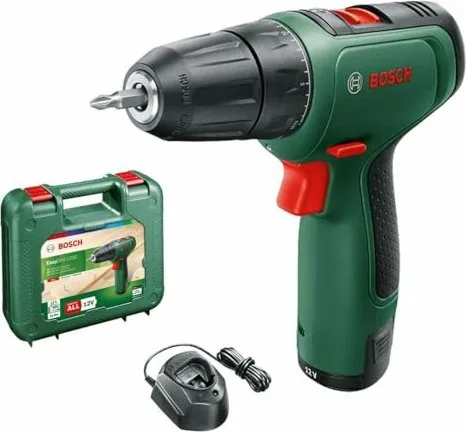
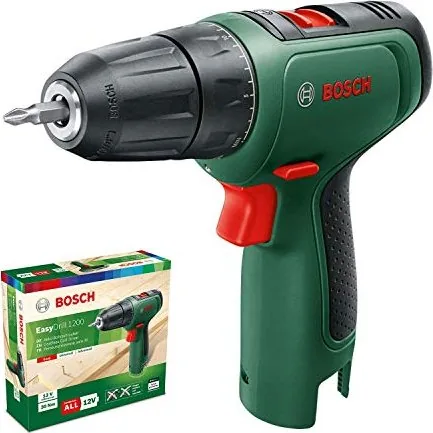
Bosch DIY EasyDrill 1200 무선 드릴 드라이버

Bosch DIY EasyDrill 1200은 편안함, 제어, 신뢰성이 중요한 일상적인 가정용 프로젝트를 위해 설계되었습니다. 이 컴팩트한 12V 무선 드릴 드라이버는 목재, 금속, 세라믹, 플라스틱에 나사 조이기와 드릴 작업을 할 수 있도록 만들어져, 다양한 작업에 하나의 공구를 원하는 DIY 사용자에게 실용적인 다목적 제품입니다.

가장 먼저 눈에 띄는 것은 단순하고 사용하기 쉬운 디자인입니다. 토크 사전 설정 링은 20단계를 제공해 작업에 맞게 출력을 조절하고 나사를 과도하게 조이지 않도록 도와줍니다. 드릴 작업 시에는 전용 모드로 전환되며, EasyImpact 1200 형제 모델은 벽돌과 조적재에 사용할 수 있는 임팩트 드릴 기능을 추가합니다. 따라서 부피가 큰 전문 장비로 넘어가지 않으면서도 유연성이 필요한 사용자에게 매력적인 라인업입니다.

EasyDrill 1200은 두 가지 기계식 속도 범위도 제공합니다. 낮은 속도는 나사 체결이나 큰 직경의 드릴 작업에 적합하고, 높은 속도는 작은 드릴 비트와 더 빠른 드릴링에 도움이 됩니다. 가변 속도 트리거와 함께 사용하면 반응성이 좋고 제어하기 쉽습니다. 내장 조명도 유용한 기능으로, 모서리, 수납장, 어두운 공간에서 작업할 때 특히 편리합니다.

Bosch는 안전과 편의성에도 분명히 신경을 썼습니다. 스핀들 잠금 장치는 비트 교체를 빠르게 해주며, 자동 잠금 기능은 배터리가 부족할 때도 공구를 사용할 수 있게 합니다. 사용 설명서에는 작업물을 고정하고, 안정된 자세를 유지하며, 드릴링 전에 숨겨진 전선이 없는지 확인하는 등 올바른 사용법도 강조되어 있습니다. 이러한 안내는 사용 중뿐 아니라 더 안전한 습관을 돕는다는 점에서도 이 공구를 믿을 수 있게 만듭니다.

가벼운 수준에서 중간 정도의 DIY 작업에는 EasyDrill 1200이 이상적인 균형을 제공합니다. 작고 가벼워 다루기 쉽지만, 가구 조립, 선반 설치, 기본 수리 같은 일반적인 가정 작업을 수행하기에 충분한 토크를 제공합니다. 더 단단한 소재에 더 강한 성능이 필요하다면, EasyImpact 1200 버전이 익숙한 Bosch DIY 방식은 그대로 유지하면서 임팩트 드릴 기능을 추가합니다.

참고

  • 일상적인 가정 및 작업실 작업에 가장 적합합니다.
  • 더 나은 결과를 위해 올바른 모드와 토크 설정을 사용하세요.
  • 처음 사용하기 전에 배터리를 완전히 충전하세요.
  • 공구를 깨끗하게 유지하고 배터리를 올바르게 보관하면 수명이 길어집니다.
M: OA-GPT-54-NAN

© Copyright 2026 Manual.ly