Manual.ly Logo

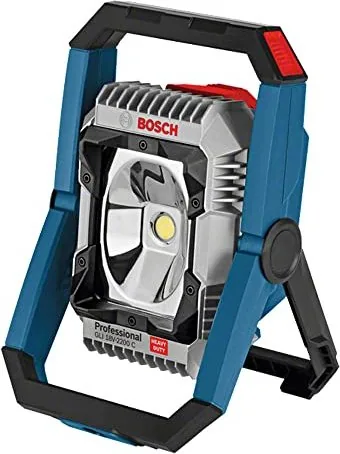
Bosch Professional GLI 18V-2200 C Sayong-Seolmyeongseo

5.0 · 1 평점

PDF 설명서 · 147 페이지

한국어

M: GO-GEM-FL-25
페이지

/ 147

Loading...
8dedd109a88b4f7410bf56f6fae015d00bfa page c
12 | English
1 609 92A 3WZ | (12.04.2018) Bosch Power Tools
Close the battery cover (3) and then the locking mechanism
of the battery cover (2).
u Make sure that the rubber lip is seated correctly when
closing the battery cover. Otherwise protection against
dust and splash water will not be ensured.
Setting up
Carefully fold out the stand (5) and place the cordless work-
light on the floor. Ensure that the tripod has a firm footing.
Fastening to the tripod
You can use the tripod mount (7) to screw the cordless
worklight onto a tripod.
Tighten the 5/8" screw. Ensure that the tripod has a firm
footing.
Swivelling the Lamp Head (see figure A)
The lamp head (4) is attached to the carrying handle (8).
The lamp head can be set to five different positions using the
carrying handle.
Switching On/Off
To start up the cordless worklight, press the on/off switch
(1).
To switch off the cordless worklight, press the on/off switch
(1) again.
To save energy, only switch the cordless worklight on when
you are using it.
Adjusting the Brightness
Press the on/off switch (1) briefly to switch on the cordless
worklight with maximum brightness. To adjust the bright-
ness in two stages, hold down the on/off switch (1) until the
required brightness is reached.
Temperature-dependent overload protection
When the permitted operating temperature is exceeded, the
cordless worklight initially reduces the brightness before
switching itself off if required for protection. Let the cordless
worklight cool down and then switch the cordless worklight
back on.
Changing the Button Cell (see figure B)
A warning will be displayed in the app before the button cell
is fully used up.
To change the button cell (11), unlock the locking mechan-
ism of the battery cover (2) and fold up the battery cover
(3), see figure B. Unscrew the screw of the battery compart-
ment cover (9) and remove the battery compartment cover
(10). Remove the empty button cell and insert a new button
cell. Make sure that the battery holder is not damaged
when removing the cell. Make sure that the positive pole
of the button cell faces upwards.
Reattach the battery compartment cover with the screw.
Control Via App
The cordless worklight is fitted with a Bluetooth® module
which enables wireless data transfer to certain mobile
devices with a Bluetooth® interface (e.g. smartphone, tab-
let).
In order to control the cordless worklight via Bluetooth®, you
will need the "Bosch Toolbox" app. Download the app from
the corresponding app store (AppleApp Store, Google Play
Store).
Then select the "My Tools" subitem in the app. The display of
your mobile device will show you all subsequent steps re-
quired to connect the cordless worklight to the device.
The following functions will be available when a connection
has been established with the mobile device:
– Remote control
– Time control
– Grouping several cordless worklights
– Personalisation
– Status check, output of warning messages
– General information and settings
– Management
Practical Advice
Shortly before the cordless worklight switches off because
of an empty battery (13), it will flash three times and shine
with reduced brightness.
Errors – Causes and Corrective Measures
Cause Corrective measures
A Bluetooth® connection cannot be established with the
cordless worklight.
The cordless worklight is not
emitting a Bluetooth® signal.
Remove the button cell (11)
and battery (13) for 10
seconds.
The cordless worklight cannot be switched on after
wireless charging.
The inductively chargeable
battery has to be re-initial-
ised.
Remove the battery (13) for
10 seconds.
Maintenance and Servicing
Maintenance and Cleaning
The light source cannot be replaced. If the light source is de-
fective, the entire cordless worklight has to be replaced.
The cordless worklight is maintenance-free and does not
contain any parts that need to be replaced or maintained.
Only clean the cordless worklight's plastic lens with a dry,
soft cloth to prevent damage. Do not use any detergents or
solvents.
After-sales service and advice on using products
Our after-sales service responds to your questions concern-
ing maintenance and repair of your product as well as spare
parts. You can find explosion drawings and information on
spare parts at: www.bosch-pt.com
The Bosch product use advice team will be happy to help you
with any questions about our products and their accessor-
ies.

AI를 사용하여 Bosch Professional GLI 18V-2200 C 매뉴얼과 대화하세요

Bosch Professional GLI 18V-2200 C 매뉴얼에서 AI로 즉각적인 답변을 받으세요

Bosch Professional GLI 18V-2200 C에 대해 무엇이든 물어보세요. 이 매뉴얼의 해당 페이지를 기반으로 답변이 제공됩니다.

GLI 18V-2200 C 정비 일정

필요시
버튼 셀 교체

앱에 경고가 표시될 때 버튼 셀을 교체하십시오. 양극이 위를 향하도록 하십시오.

매뉴얼에서 보기 (12페이지)
필요시
플라스틱 렌즈 청소

건조하고 부드러운 천으로만 청소하십시오. 손상을 피하기 위해 세제나 용제를 사용하지 마십시오.

매뉴얼에서 보기 (12페이지)
M: QW-35-FL

질문을 하세요

0/1000

GLI 18V-2200 C을(를) 추천하시나요?

예 아니요
0
User Pic

Sofia Berg

9개월 전

배송은 얼마나 믿을 수 있나요? 그리고 주문 후에 제가 기대하는 것과 제품이 일치하나요?

0
User Pic

Manual.ly

9개월 전

최근 고객 피드백에 따르면, 배송과 제품 취급이 원활했으며 전반적인 과정이 신뢰할 수 있었습니다. 많은 리뷰어들이 제품 선택과 배송이 잘 진행되었고, 제품 자체도 기대에 부응했다고 말했습니다. 추가적인 확신을 원하시면, 주문 전에 제품 설명과 주요 사양을 확인해 주세요. 배송 현황을 추적할 수 있도록 추적 정보도 받아보실 수 있습니다. 만약 손상되거나 설명과 일치하지 않는 제품을 받으셨다면, 즉시 저희 지원팀에 연락하여 해결책을 마련할 수 있도록 도와드리겠습니다.

M: OA-GPT-5-NAN
M: OA-GPT-5-NAN

자주 묻는 질문 질문

A

실내 및 실외 작업 구역에서 휴대용 작업 조명으로 사용하도록 설계되었습니다. 강한 임시 조명이 필요한 수리, 설치, 건설 공간을 비추는 데 도움이 됩니다.

이 답변이 도움이 되었나요?

A

아니요. 단품 버전은 조명 본체만 포함됩니다. 이미 보유하고 있지 않다면 호환되는 Bosch 18V 또는 14.4V 배터리와 충전기를 별도로 구매해야 합니다.

이 답변이 도움이 되었나요?

A

네. 이 조명에는 두 단계 밝기가 있습니다. 최대 밝기로 시작하거나 스위치를 눌러 원하는 수준으로 출력을 낮출 수 있습니다.

이 답변이 도움이 되었나요?

A

네. 배터리 커버가 제대로 닫혀 있고 잠겨 있으면 먼지와 물 튐으로부터 보호되도록 제작되었습니다. 따라서 까다로운 작업 환경에 잘 맞습니다.

이 답변이 도움이 되었나요?

A

네, Bosch Toolbox 앱과 호환되는 Bluetooth® 기기를 사용하면 가능합니다. 조명을 원격 제어하고, 타이머를 설정하고, 그룹을 관리하고, 상태 정보를 확인할 수 있습니다.

이 답변이 도움이 되었나요?

A

네. 5/8인치 삼각대 마운트가 포함되어 있어 더 높거나 안정적인 위치에 조명을 설치할 수 있습니다.

이 답변이 도움이 되었나요?

M: GO-GEM-FL-25

장점 및 단점

장점

  • 밝은 2200루멘 출력으로 어둡거나 밀폐된 작업 공간에서도 선명한 시야를 제공합니다.
  • Bluetooth® 앱 제어로 원격 조작, 타이머 설정, 그룹 관리, 상태 확인이 가능합니다.
  • IP64 등급 설계로 까다로운 환경에서 먼지와 물 튐을 어느 정도 방지합니다.
  • 5단계 위치 조절이 가능한 램프 헤드, 스탠드, 삼각대 마운트로 배치 유연성이 높습니다.
VS

단점

  • 단품 버전에는 배터리와 충전기가 포함되지 않습니다.
  • 광원은 교체할 수 없어 고장 시 본체 전체를 교체해야 합니다.
  • 앱 기능을 사용하려면 호환되는 Bluetooth® 모바일 기기와 Bosch Toolbox 앱이 필요합니다.
  • 도로 교통용이나 일반 실내 조명용으로는 적합하지 않습니다.
M: GO-GEM-FL-25

제품 사양

작동 모드

충전용 14.4-18 V 리튬 이온

광원

LED, 2200 lm

특장점

과전용 직경이, IP54, 케이블 재업 (브러시)

무게

1.90 kg (충전용 리튬 제일)

구성품

충전기 및 충전기 케이블

M: GO-GEM-FL-25

제품 설명

Bosch Professional GLI 18V-2200 C 무선 작업등 단품 사용 설명서

Bosch Professional GLI 18V-2200 C 무선 작업등 단품 사용 설명서는 작업 현장에서 밝고 휴대 가능하며 신뢰할 수 있는 조명이 필요한 사용자를 위해 설계되었습니다. 강력한 2200루멘 출력으로 고정 조명이 약하거나 없거나 단순히 실용적이지 않은 작업 구역에서도 선명한 시야를 제공합니다. 따라서 건설, 설치, 수리, 유지보수 작업에 적합합니다.

이 제품은 밝기만큼이나 유연성에도 중점을 둔 설계를 갖추고 있습니다. 램프 헤드는 다섯 가지 방식으로 위치를 조절할 수 있어 가장 필요한 곳에 빛을 비출 수 있습니다. 내장 스탠드는 바닥에 안정적으로 놓을 수 있게 해주며, 5/8인치 삼각대 마운트는 삼각대에 장착해 더 넓은 범위를 비추기 쉽게 해줍니다. 운반 손잡이는 방, 층, 작업 구역 사이를 빠르게 이동하는 데에도 도움이 됩니다.

내구성도 핵심 강점입니다. Bosch는 이 조명을 특수 배터리 커버와 함께 설계해 올바르게 닫았을 때 먼지와 물 튐으로부터 보호하며, IP64 등급을 제공합니다. 즉, 많은 기본 무선 조명보다 더 혹독한 작업 환경을 견딜 수 있습니다. 열 보호 시스템은 기기가 너무 뜨거워지면 먼저 밝기를 낮추고 이후 자동으로 꺼지도록 도와 더 안전한 장시간 사용을 지원합니다.

GLI 18V-2200 C의 스마트 기능은 가치를 더욱 높여줍니다. Bluetooth®와 Bosch Toolbox 앱을 통해 조명을 원격으로 제어하고, 타이머를 설정하고, 여러 조명을 그룹으로 묶고, 설정을 개인화하고, 상태 정보를 확인할 수 있습니다. 이는 대규모 현장에서 여러 작업등을 관리하는 전문가나, 이동 없이 더 정밀한 조명 제어가 필요한 경우 특히 유용합니다.

단품 버전인 이 모델은 조명 본체에 집중되어 있어 배터리와 충전기는 별도로 구매해야 합니다. Bosch 14.4V 및 18V 배터리와 호환되어 이미 Bosch Professional 배터리 시스템을 사용 중인 사용자에게 편리합니다. 그 결과 강력한 조명, 스마트 제어, 견고한 내구성을 하나의 컴팩트한 공구에 담은 실용적인 작업 현장용 조명이 됩니다.

참고 사항

  • 단품 패키지에는 배터리와 충전기가 포함되지 않습니다.
  • 광원은 교체할 수 없으며, 고장 시 전체 본체를 교체해야 합니다.
  • 먼지와 물 튐 보호를 최적으로 유지하려면 배터리 커버를 항상 올바르게 닫고 잠그십시오.
  • 이 조명은 작업용 조명으로 설계되었으며, 도로 교통용이나 일반 실내 조명용이 아닙니다.
M: GO-GEM-FL-25

© Copyright 2026 Manual.ly